Using Visual C++ - Quick Tutorial
The first language I used to learn Object Oriented Programming was C++. Now after using Python for more than 6 years, it is time to de-rust my C++ coding skills.
What is C++?
C++ is a compiled programming language where code is translated into machine code before running. It is statically typed, meaning you must declare variable types upfront. Offering direct control over system resources like memory and processing power, that supports procedural, object-oriented, and generic programming styles. It is commonly used for games, operating systems, and performance-critical applications.
My main reason is I want something that is able to handle streams of financial data while simultaneously evaluating models based on the latest tick data (from my previous Python project using the IBKR Python API). The IBKR API also has support for C++.
How is C++ different from Python?
C++ requires you to declare types explicitly while Python figures them out automatically as the program runs. The code must be compiled before execution whereas Python runs line by line through an interpreter. It makes you manage your own memory manually while Python cleans up memory automatically. C++ projects typically split across multiple header and source files while Python often uses single files.
Benefits & Hurdles
Benefits include faster execution speed since it compiles directly to machine code, fine-grained control over memory and hardware resources, and the ability to optimize aggressively for specific platforms.
Hurdles include a steeper learning curve with complex concepts like pointers and memory management, slower development due to the compile-run-debug cycle, harder debugging with cryptic error messages, and more tooling complexity requiring understanding of build systems and linking.
A Simple Calculator App
Since it has been a while since I have used C++, I have decided to build a basic arithmetic calculator that does:
- Addition
- Subtraction
- Multiplication
- Division
1 - Create the main CalculatorTutorial.cpp
This is the main app. It handles all user interaction including displaying messages, reading input, checking for errors like division by zero, calling the calculator to perform math, and showing results. It runs in an infinite loop.
Show the calculator title on screen
Show instructions for how to enter equations

Create a calculator object to use for math

Keep running forever:
    Ask user to type two numbers and an operator
    Read the first number, the operator, and the second number

    Check if user is trying to divide by zero
    If yes:
        Show an error message about dividing by zero
        Skip this calculation and ask for new input

    If no:
        Send the numbers and operator to the calculator
        Get back the result

    Display the full equation and its answer
2 - Create header file Calculator.h
This is the header file that tells other parts of your program what the Calculator class offers without revealing how it works internally. Any file that wants to use the calculator includes this header to know what functions are available and what parameters they require.
Declare a Calculator class that others can use

Inside the class, declare one public function named Calculate
    This function needs two decimal numbers and one operator character
    It will return a decimal number as the answer
3 - Create Calculator.cpp
This is the implementation file that contains the actual logic behind the calculator. The switch statement checks which operation was requested, performs the appropriate math, and returns the result. This separation keeps the math logic isolated from the user interface code.
Implement the Calculate function declared in the header

Look at the operator character:
    If it is plus, add the two numbers and return the sum
    If it is minus, subtract and return the difference
    If it is multiply, multiply and return the product
    If it is divide, divide and return the quotient
    If it is anything else, return zero as a default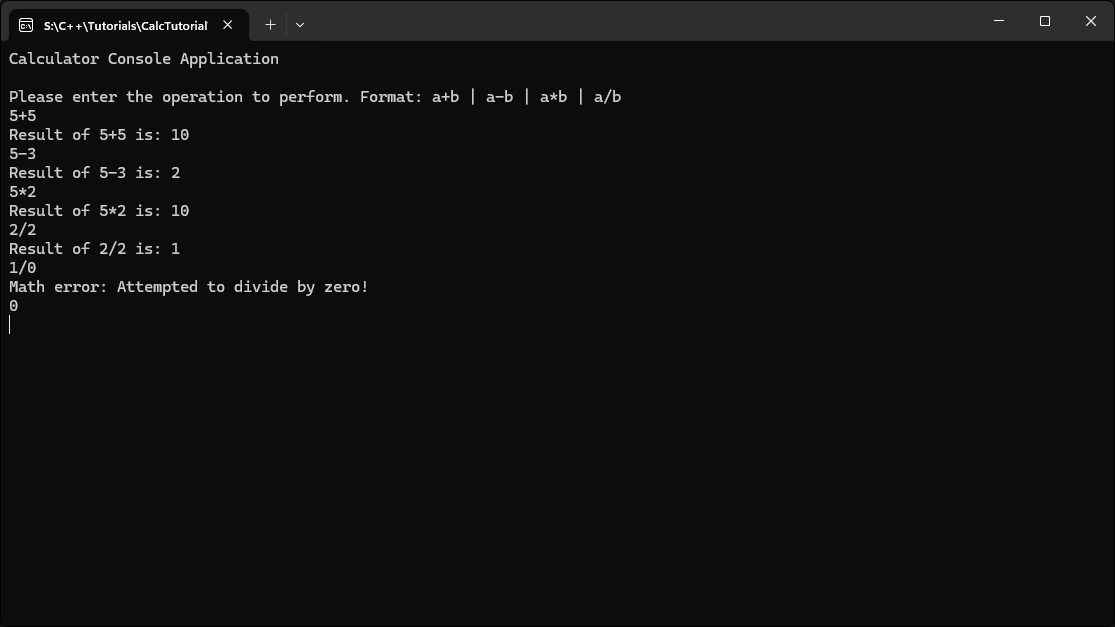
Conclusion
I believe that both C++ and Python have their places in a project. There are things that do not require the deep level of optimization, where Python can be a great time saver because of its simplicity.
From now own I will be switching back and forth between the two languages and creating projects based off finance/math/physics.
As always, the complete C++ code is in my GitHub, as is all my other projects. You can check them out by clicking the link to the repo here: https://github.com/MyQuantJourney/MyQuantJourney.git