Creating a Live Forex Data Tracker App - Quick Tutorial

Being able to handle large streams of live data is very important when considering inserting them into financial models.
As I am going through my list of tasks for a general Interactive Brokers (IBKR) automated app, one of them is to try to get live data streamed tick-by-tick for my models into an interactive Graphical User Interface (GUI) application.
This task, when automated, can allow me to have a visual indicator as I am coding. There is a caveat. There is not really a need to create such a GUI application, as the IBKR Trader Workstation (TWS) has the ability to customize your windows to show specific functions, one of them being a live Forex ticker list.
So this project will be less focused on the GUI application, and more about just invoking the IBKR API and IB_async to retrieve live data.
Building the GUI application using PyQt5
PyQt5 is a comprehensive set of Python bindings for Qt v5, allowing developers to create cross-platform desktop applications (Windows, Linux, macOS, Android, iOS) using Python.
It offers over 1,000 classes for building GUIs, which saves a lot of boilerplate on my end.
1 - Setup & Imports
Import Qt widgets, asyncio, qasync bridge, IB API2 - GUI Ticker Table Instance
Maintains a live view of market data by mapping IB's contract IDs to table rows. Populating the 'Header' list with the needed symbol values carries over to the whole application. In other words, all you need to do is update this list, and the application pulls the required data for you automatically. For example, if I also want the open/high/low/close data of the symbol, I simply need to just append them to this one line only.
Class TickerTable extends QTableWidget:
    Headers = [symbol, bidSize, bid, ask, askSize, last]
    Map: contractID → rowIndex

    addTicker(ticker):
        Create new row
        Store contract→row mapping
        Initialize cells with "-"
        Set symbol name in first column

    onPendingTickers(tickerBatch):
        For each ticker in batch:
            Lookup row from contractID
            Update cell values from ticker attributes
3 - GUI Window
Sets up connection and contract subscriptions.
Class Window extends QWidget:
    UI Components:
        - LineEdit (symbol input)
        - TickerTable (data display)
        - ConnectButton (toggle)

    IB Setup:
        - IB client instance
        - Subscribe table.onPendingTickers to IB data feed

    add():
        Parse input text as Contract
        Schedule async: _add_contract()

    _add_contract(contract):
        Qualify contract with IB (resolve details)
        If valid and not duplicate:
            Subscribe to market data stream
            Add to table

    onConnectButtonClicked():
        If connected: Disconnect + clear table
        Else: Schedule async: _do_connect()

    _do_connect():
        Connect to IB Gateway/TWS
        Set market data type (delayed realtime)
        Load default forex pairs (EURUSD, etc.)
4 - Event Loop (Main)
main():
    Create Qt App
    Set global font
    Create qasync QEventLoop (bridges Qt + asyncio)
    Create Window (localhost:4002)
    Show window
    Run event loop forever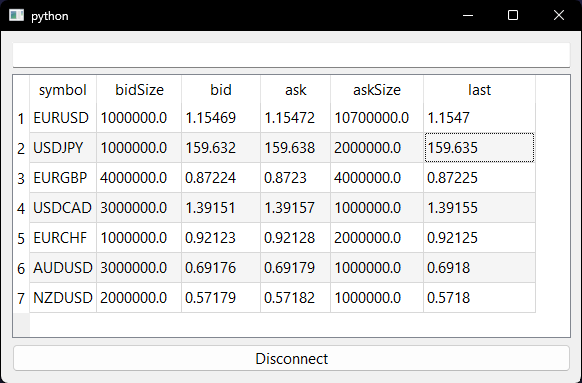
Conclusion
IBKR has a multitude of way of getting a live data feed for analysis. The complexity is honestly fully within model implementation and not data collection, as that becomes very simple and routine once you figure it out.
The only big problem that I have been personally affected by is the fact that apart from the following asset types:
- Forex
- Metals
- US Bonds
The remaining assets require a paid subscription to IBKR, which ends up limiting my asset universe. One idea I have been thinking about is having a strategy that does not need the type of granularity of live data of less than 15 minutes. Creating a 1 hour bar data strategy will be able to offset this limitation.
As always, my Python code is available in my GitHub repo: https://github.com/MyQuantJourney/MyQuantJourney.git